Remote Verification of Identity: A Founder's Guide 2026
Learn how remote verification of identity works when forming a company: document checks, liveness tests, secure signing, and what to prepare.
You just signed your first major European client, your billing setup needs a proper EU entity, and the last thing you want is to burn half a week flying abroad to sit in a municipal waiting room. Good news: you don't have to book a flight or touch a single paper courier form. Everything in modern cross-border incorporation happens online, and it's remarkably straightforward once you know what your screen is asking for.
Most founders assume remote verification of identity means snapping a quick selfie and hoping an algorithm gives a green light. That assumption is why avoidable delays happen. A proper remote check is a four-layer evidence-binding process where each layer supports a specific incorporation milestone, from proving your passport is genuine to sealing your company's articles of association.
When you see how those four layers fit together, the whole setup stops feeling mysterious. You know what documents to place on your desk, what the notary inspects on camera, how to recover if a sensor rejects your photo, and how that verified session turns into an active European company.
Table of Contents
- What Remote Verification of Identity Really Means
- The Four Checks and What to Prepare
- How Secure Online Signing Turns a Check into a Company
- When a Check Fails and How to Recover
- Why Bulgaria Pairs So Well with Remote Formation
- Your Next Step to a Fully Remote EU Company
What Remote Verification of Identity Really Means
Remote verification of identity locks four separate proofs to four points in company formation. A quick selfie score does not register an EU limited company. The Commercial Register needs a genuine ID, a live match to the holder, a signing credential bound to that person, and company documents that carry the same identity.
You still do the whole thing from a laptop. A founder in Lisbon, Dubai, or Toronto joins a European online notary at 9:00 a.m. local time. The sitting runs 30 to 60 minutes. No flight, no hotel, no courier envelope. In that window you prove who you are and sign every document the registration needs.
Time the four proofs against the milestones, not against a single camera prompt.
The first proof is the document. Before any filing starts, your government ID has to be genuine and unaltered. The second proof is the person. During the live session, the face on camera has to be the rightful holder of that ID. The third proof is the credential. Your verified identity is bound to a signing key that only that session can use. The fourth proof is the filing itself. The signed articles and related company documents reach the Commercial Register with that binding intact.
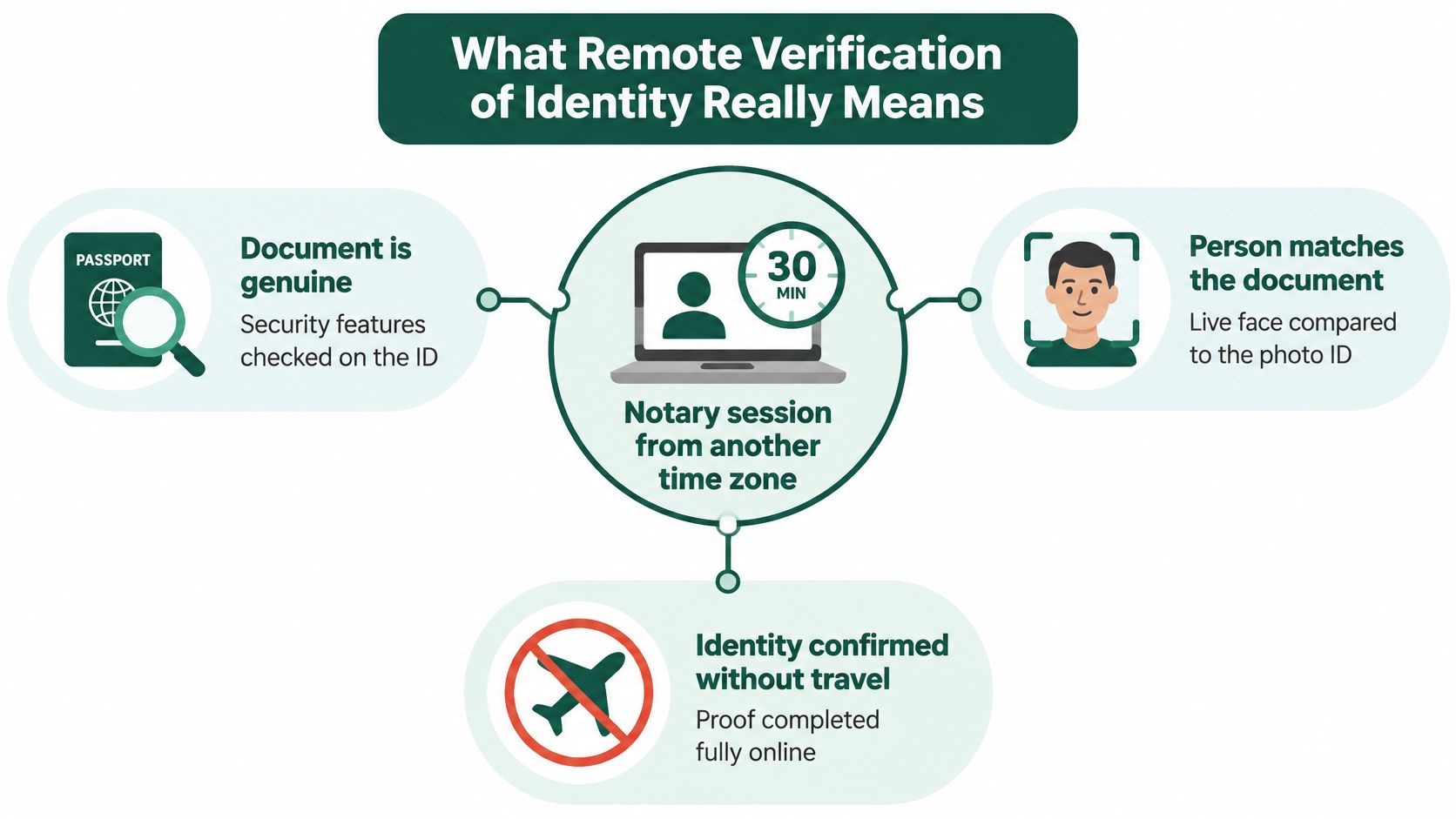
An airport officer checks a passport under special light, matches the face, and stamps entry in one motion. A remote notary session splits that encounter into controls you can see: the document image, the live camera, then the signature screen. One failed control stops the next milestone. Four clean passes, and the notary moves straight to the company documents in the same sitting.
Built on Global Standards Not Shortcuts
Digital-identity policy has spent years writing remote proofing into formal rules. The National Institute of Standards and Technology formalized remote proofing in NIST Special Publication 800-63-3, finalized on June 22, 2017, which established technical requirements for identity proofing, registration, and authentication over open networks.
NIST has since issued a newer revision, SP 800-63-4, that refines these remote proofing requirements. For a cross-border incorporation, book the supervised live video session with a human notary. That is the control that ties your passport, your face, and your signature into one record the Commercial Register can rely on. An automated scan that never reaches a notary leaves those layers unbound.
The Four Checks and What to Prepare
Remote proofing isn't a second-tier substitute for showing up in person. According to NIST Special Publication 800-63A, credential service providers can use remote identity-proofing processes to reach levels of confidence and security comparable to in-person events. That guidance lays out the exact four-part control sequence used in serious online incorporation: collecting evidence, validating the document, verifying the applicant, and binding the identity to a credential.
The diagram below maps each stage from your initial document photo to your verified signing record:
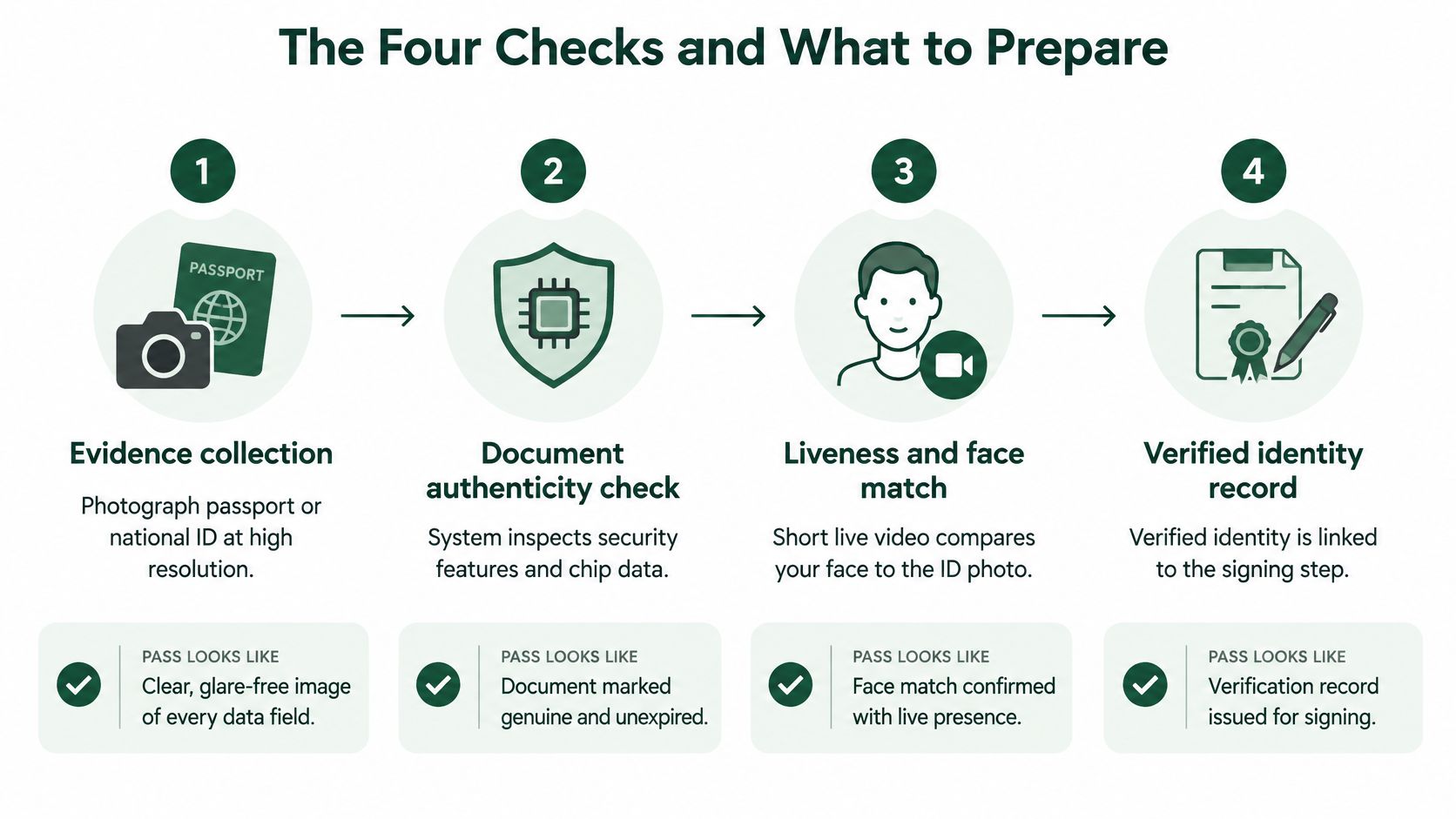
Here is what happens on screen at each layer, what the verification engine inspects behind the scenes, and what a clean pass looks like.
- Evidence collection. You place your passport or national ID flat on a plain, dark, matte surface and photograph the data page using your phone or webcam. Keep all four corners inside the frame with zero overhead glare. The system evaluates image resolution, sharpness, and edge visibility; a pass means every letter, portrait pixel, and machine-readable line is crisp enough for automated extraction.
- Document validation. You don't touch anything during this check, though some apps ask you to tilt the ID gently so the camera captures holographic reflections or tap the passport against your phone's NFC chip. Behind the scenes, software parses the machine-readable zone (MRZ), checks cryptographic chip signatures, verifies security patterns, and inspects fonts for digital tampering or expiry. A pass confirms the document is authentic, unaltered, and valid.
- Identity verification and liveness. The screen prompts you to center your face in an oval frame and either hold still for passive capture or follow a quick prompt like turning your head slightly. The platform compares your live facial geometry against the ID portrait while running liveness detection. As outlined in the ENISA Remote ID Proofing Report, attackers attempt to fool cameras using printed photographs, replayed videos, three-dimensional masks, manipulated IDs, and deepfakes, which is why ENISA specifically recommends liveness detection alongside presentation-attack and injection-attack controls. A pass proves a live human is sitting in front of the camera and matches the legitimate passport holder.
- Binding and signing. Now your verified identity connects directly to your incorporation milestone. In Step 3 of our remote company setup, you complete identity verification and sign your corporate paperwork remotely during one secure online notary session. The verified identity is bound to a signing credential, and the platform retains an auditable decision record containing the captured evidence, timestamps, verification results, model versions, reviewer actions, and your consent.
Why Layered Checks Beat a Simple Selfie
You might wonder why a platform checks device telemetry, runs sanctions screening in the background, and escalates ambiguous captures to a trained human reviewer instead of trusting a single facial-match score. Fraudsters now combine stolen IDs with synthetic media. According to the 2025 State of Identity Fraud Report, 46% of surveyed businesses reported a year-over-year rise in deepfake and generative-AI fraud, and 96% viewed it as a threat to their organization. The same report noted Entrust's finding that deepfake attacks occurred roughly every five minutes during 2024, while digital-document forgeries surged 244% year over year.
Relying purely on an "AI-powered" deepfake detector creates a dangerous single point of failure. Say an attacker steals a genuine passport photo and injects a synthetic video stream straight into a browser's virtual camera. A face-match algorithm might still score high, while device integrity checks, injection-resistance controls, and a human notary asking an unscripted question stop the impersonation cold.
Founders also deserve clarity on privacy and accountability. When we handle your formation, personal verification data is shared only with required Bulgarian authorities such as the Commercial Register and the National Revenue Agency, and any transfer outside the European Union follows strict GDPR safeguards. Evidence is retained strictly for statutory compliance and auditability, and if an automated filter falsely flags your session, you always have the right to escalate to a human reviewer and challenge the rejection.
Watch this short walkthrough to see how remote identity proofing and biometric document checks work in practice:
Your One-Screen Preparation Checklist
Gather everything below on your desk before you click the verification link. Having these items ready turns a stressful scramble into a smooth, single-sitting approval.
- Valid Government ID: Use an unexpired passport or EU national identity card with an undamaged photo page, and double-check that your provider accepts your specific document type.
- Recent Proof of Address: Prepare a utility bill, bank statement, or tax notice printed in Latin characters (providers commonly require a date within the last three months, for example a recent electricity or broadband bill).
- Ownership and Management Details: Write down the exact full names, residential addresses, and shareholding percentages for every shareholder and ultimate beneficial owner.
- Company Setup Particulars: Have your proposed company name, primary business activities, and your Sofia virtual office address ready, which we supply for company registration and official correspondence.
- Legalized Corporate Records: If another company will hold shares in your new entity rather than an individual, organize certified corporate extracts ahead of time and review what apostilled documents are so your foreign paperwork clears Bulgarian filing rules without delay.
Skip the three classic delays: A harsh desk lamp casting glare across your passport photo, an ID that expired last month, and a six-month-old utility bill cause more postponed sessions than any technical glitch. Inspect every page in daylight before your appointment starts.
How Secure Online Signing Turns a Check into a Company
Passing an identity check proves who you are, yet it doesn't bring a company into existence. Your incorporation becomes legally real at the moment you sign the founding documents in a format the Commercial Register and European courts recognize without question.
Under the European Commission's eIDAS Regulation, qualified electronic signatures carry the exact same legal effect as handwritten signatures across every EU member state. That same framework authorizes remote identification for issuing qualified signing certificates, provided the process uses a notified electronic ID at substantial or high assurance or another remote method confirmed by an accredited conformity-assessment body.
Once your live verification passes, the platform or online notary moves straight into the signing room, where you review and seal your company's core filings digitally:

On screen, you'll see your articles of association, beneficial-ownership declarations, manager consent forms, and Commercial Register filings queued up in order. You read each document, confirm the details match your spelling and share split, and trigger the signature via a one-time authentication code or qualified signing token. Each signed file receives a cryptographic seal and an official timestamp from a qualified trust-service provider.
Qualified Signatures Versus Click-to-Sign Tools
Ordinary e-signature apps where you type your name in cursive or scribble with a mouse work fine for freelance proposals and NDAs. They fail completely for EU company incorporation. Commercial registers demand proof of signer identity, certificate provenance, and tamper-evident sealing that a basic click-to-sign tool doesn't generate.
A qualified electronic signature embeds verifiable proof of who signed, the exact second the signature occurred, and the accredited authority that validated your identity. Because eIDAS mandates cross-border recognition, your signed incorporation deed travels legally across EU borders without needing extra physical notarization or an apostille just to prove the signature is yours. If you want to see exactly how notaries validate those sessions before issuing the seal, review the online notary requirements before booking your slot.
Never sign blank, template-only, or unread corporate documents just to finish a call faster. Confirm that your provider issues a qualified electronic signature rather than a simple or advanced signature for register filings, and download every signed PDF plus your verification receipt the moment the session closes.
As soon as the last declaration is sealed, your corporate representative submits the electronic dossier directly to the register, and your official incorporation timeline begins.
When a Check Fails and How to Recover
The single most frequent failure in remote onboarding has nothing to do with fraud or eligibility: a ceiling light bounces off the laminate over a passport photo, washing out the security print and triggering an instant automated rejection. Don't panic if a red warning pops up on your screen. Well-designed verification workflows treat a failed automated check as a routing decision, never a permanent dead end.
Strict error rates exist for a reason. In its 2025 quantitative framework for remote identity validation, the Department of Homeland Security and NIST proposed a 97% target for overall legitimate identity-validation success alongside far tougher security bars: 99.99% attack rejection for selfie-match-to-document subsystems and 99% attack rejection for document-validation and presentation-attack-detection subsystems. When security thresholds are calibrated that tightly to keep deepfakes and forged IDs out, minor real-world friction like backlighting or a scratched webcam lens can trip a false rejection.
Use this diagnostic table to spot what went wrong and fix it on the spot:
| What you see | Likely cause | Immediate fix | Escalation |
|---|---|---|---|
| Document photo rejected | Glare, shadow, cropped corner or folded page | Retake flat in daylight, all four corners visible | No, retry |
| Liveness check failed | Backlight, mask, hat, sunglasses or poor camera | Face a window, remove accessories, use a newer device | Retry twice, then manual review |
| Face match below threshold | Beard, weight change, glasses or heavy makeup | Remove glasses, match the document photo style | Manual review with a second ID |
| Name mismatch | Transliteration or middle-name formatting | Ask provider to align spelling with the passport | Support ticket with passport scan |
| Expired or damaged ID | Document past validity or unreadable chip/MRZ | Use a second valid identity document | Manual review |
| Non-biometric exclusion | Disability, low digital skills, weak connection or document-country mismatch | Request human-assisted or non-biometric route | Always escalate to a human agent |
Accessibility and Fair Fallbacks for Global Founders
Camera glitches are easy to solve. Harder barriers show up when a founder has a disability, lives in an area with unstable mobile bandwidth, uses an older phone, speaks a different native language, or holds a passport from a country whose template an automated scanner handles poorly.
This isn't a fringe edge case. A 2025 UK government digital identity analysis of 3,561 adults found that people with lower digital skills, lower digital access, or limited access to identity documents were less likely to have used digital identity services. Only 5% explicitly blamed access, 4% usability, and 2% transparency, which likely masks silent drop-offs when legitimate users assume a broken screen means they don't qualify. Even more telling, government monitoring found that only 73% of surveyed digital-identity services offered at least one accessibility feature, despite 60% meeting WCAG 2.0 AA standards or higher.
A trustworthy remote formation partner never abandons you to an endless loop of failed automated scans. Solid fallback routes include human-assisted verification, non-biometric alternatives, scheduled live video appointments with a notary, certified paper copies when needed, clear translated instructions, defined retry limits, plain-language rejection reasons, and a documented appeal path. Your nationality, country of residence, passport format, and whether your company involves multi-layered beneficial owners all shape which alternative route applies, so a real advisor should map that out before you start.
Before you pay any incorporation provider, ask one direct question: what is your human escalation path when the automated check says no?
Why Bulgaria Pairs So Well with Remote Formation
Remote identity verification removes geography from your company-building decision, which puts European tax competitiveness front and center. According to the European Commission Taxes in Europe Database, Bulgaria levies a flat 10% corporate income tax with no central, regional, or local corporate surcharge, creating a 10% combined nominal rate. That puts Bulgaria among the lowest headline corporate-profit rates in the EU, while keeping full single-market credibility.
| Country | Headline corporate income tax rate | What the rate does not cover |
|---|---|---|
| Bulgaria | 10% | VAT, payroll contributions, withholding tax, dividend tax, accounting obligations |
Keep the math grounded in reality. Bulgaria's 10% rate applies strictly to net taxable profit, never gross revenue. Forming a company in Sofia does not eliminate EU VAT obligations, payroll and social contributions, withholding taxes, statutory bookkeeping, or personal tax-residence rules in the country where you physically live. Bulgaria can also levy a separate dividend tax depending on who receives the distribution and how your ownership is structured. What you gain is a low headline corporate-profit rate paired with full single-market credibility, not an escape hatch from tax compliance.
Electronic Filing Speed and Concrete Cost Savings
A low corporate tax rate loses its appeal if incorporating requires weeks of in-person bureaucracy. Bulgaria avoids that trap because its Commercial Register supports electronic submission end to end. Data from the World Bank 2024 B-READY report shows a standard Bulgarian business-entry timeline of 10 days total, split into roughly 2 days for company registration and 8 days for VAT registration. Filing electronically also cuts the official state registration fee in half: BGN 55 online compared with BGN 110 for in-person registration.
For founders, the practical win is sequence clarity. Your identity evidence, address documentation, ownership and management structure, business activity codes, and any required notarized or apostilled certificates must be ready before filing starts. That is exactly why the four-layer evidence-binding approach matters: each layer supports a filing milestone, from notarized identity confirmation to beneficial ownership records, rather than sitting as a stand-alone selfie check. The National Revenue Agency often reviews VAT applications after the company enters the Commercial Register, so do not assume your incorporation certificate and your active EU VAT number arrive on the exact same afternoon. Schedule your first VAT-inclusive client invoice around your expected VAT activation window so your accounting stays clean from day one.
Your Next Step to a Fully Remote EU Company
The entire path from global founder to active European business comes down to four connected milestones: verify your identity across all four layers, sign with an eIDAS-qualified credential, file electronically with the register, and activate your VAT and banking. You complete every stage from your laptop without ever stepping onto a plane.
If you want one team to coordinate the accountants, notaries, translators, and government filings end to end, our Online package is €1,750. It covers Bulgarian limited company registration as an EOOD (single owner) or OOD (multiple owners), EU VAT number registration, business banking assistance with providers such as Revolut, Wise, UniCredit, and Paysera, a Sofia virtual office and registered business address, apostilled company documents, your certificate of incorporation, and all legal and government fees. Remote company formation takes 3 to 5 working days once we receive all required documents and payments. Founders who prefer visiting Sofia can choose our In-person package for €1,500, which includes the same core registration, EU VAT number, banking assistance, virtual office, certificate of incorporation, legal and government fees, plus complimentary airport pickup in 2 to 3 working days.
Let's be upfront about two real-world limits. First, while we guide your application with partner banks and fintech providers for an EU IBAN, we cannot guarantee bank account approval because every financial institution makes its own independent compliance decision. Second, fast turnarounds depend on you sending clean, requested documents promptly. For a closer look at every administrative stage before you commit, read our guide on how to register a company online.
Four Actions to Take This Week
- Pull together your passport scan, recent Latin-character proof of address, and exact shareholder percentages so nothing stalls your intake.
- Reserve your remote online notary session at a quiet time of day with strong natural daylight on your face.
- Verify ahead of the call that your incorporation filings will be sealed with a qualified electronic signature accepted by the Commercial Register.
- Pencil your first EU client invoice for the week after your VAT number activates rather than your registration date.
Ready to turn a smooth remote identity check into a fully registered Bulgarian EOOD or OOD without leaving your desk? We coordinate the secure online notary session, qualified electronic signing, EU VAT registration, banking introductions, Sofia virtual office, and ongoing accounting under one roof so nothing falls through the cracks. Visit FastCorp today to start your remote EU company formation and get your personalized document checklist.