Online Notary Requirements: A Practical 2026 Guide
Learn the online notary requirements for 2026, from ID checks and e-sign rules to video verification, cross-border use, and how remote notarization works

In 2026, every remote online notarization needs three essentials: a commissioned or authorized notary, a live two-way audio-video session, and verified government-issued identification. The notary must also use a compliant electronic seal and preserve the required records.
You're a first-time founder in a Lisbon coworking space at 11 p.m., with incorporation documents open on your laptop and a U.S. filing deadline approaching. The signing appears simple, but practical questions quickly surface. Can a U.S. notary notarize your signature while you're in Portugal? Will the platform accept your passport? Will the receiving authority recognize a remotely notarized document?
Those questions matter because online notarization has moved from a niche legal option to a near-national U.S. framework. Virginia authorized remote electronic notarization first, with its law taking effect in 2012. By 2026, 45 states plus the District of Columbia had enacted RON statutes, while 15 states saw RON laws take effect in 2020 alone. The AFSA remote online notarization white paper traces that rapid legal expansion.
For founders, the important point isn't that a signing can happen online. The document must survive the entire journey, from identity checks and live video to electronic storage, filing, and possible international use. This guide follows that journey through four pillars: notary authorization, identity proofing, live audiovisual communication, and compliant electronic signature technology.
Table of Contents
- Why Online Notarization Matters for Founders in 2026
- What Online Notarization Actually Means
- The Four Core Legal Requirements
- Identity Verification and E-Signature Mechanics
- State-by-State Rules and Cross-Border Use
- Why Online Notarization Is Relevant for EU Founders
- Common Misconceptions That Lead to Rejected Documents
- Practical Checklist and What's Changing Next
Why Online Notarization Matters for Founders in 2026
A founder signing from abroad often sees only the final click. The receiving authority sees a chain of evidence. It may need to establish who signed, whether the notary was authorized, whether the session happened live, whether the document changed afterward, and whether the electronic record can be produced later.
The pandemic accelerated this workflow, especially in real estate and other transaction-heavy sectors. The American Land Title Association market coverage reported by HousingWire recorded a 547% increase in remote online notarization adoption among major vendors surveyed in 2020. Digital closings also rose from 14% of professionals offering them before the health crisis to 46% in 2021. The shift made remote signing less of an emergency workaround and more of a normal operating layer.
For a founder, that layer can remove travel from incorporation, powers of attorney, banking documentation, and board resolutions. It can also create a false sense of simplicity. “Everything is online” doesn't mean every document, notary, platform, or receiving institution follows the same rule.
Practical rule: Treat the recipient's acceptance requirements as part of the notarization process, not as a separate administrative detail.
A founder forming a company in Europe may still need an apostille, an original electronic file, a specific certificate wording, or a notary commissioned in a particular jurisdiction. The European company registration guide can help place remote signing within the wider incorporation process, but the recipient's own instructions remain decisive.
The rest of the process becomes easier once you stop viewing RON as “signing a PDF” and start viewing it as a controlled evidence trail. Your camera and ID are only the first layer. The notary's authority, platform controls, recording, journal, seal, retention period, and cross-border destination all matter.
What Online Notarization Actually Means
Your founder is in one country, the notary is in another location, and a document must be signed before a deadline. Remote online notarization, or RON, connects those people through a secure platform while preserving the controls of a notarial act. The signer and notary communicate through live audio and video. The notary verifies identity, watches the signing, completes the certificate, and applies an electronic seal.
RON works like a guarded video meeting. A standard call lets people see and hear one another. A RON session adds identity checks, document controls, a digital certificate, an electronic journal, and a recording that can support later review.
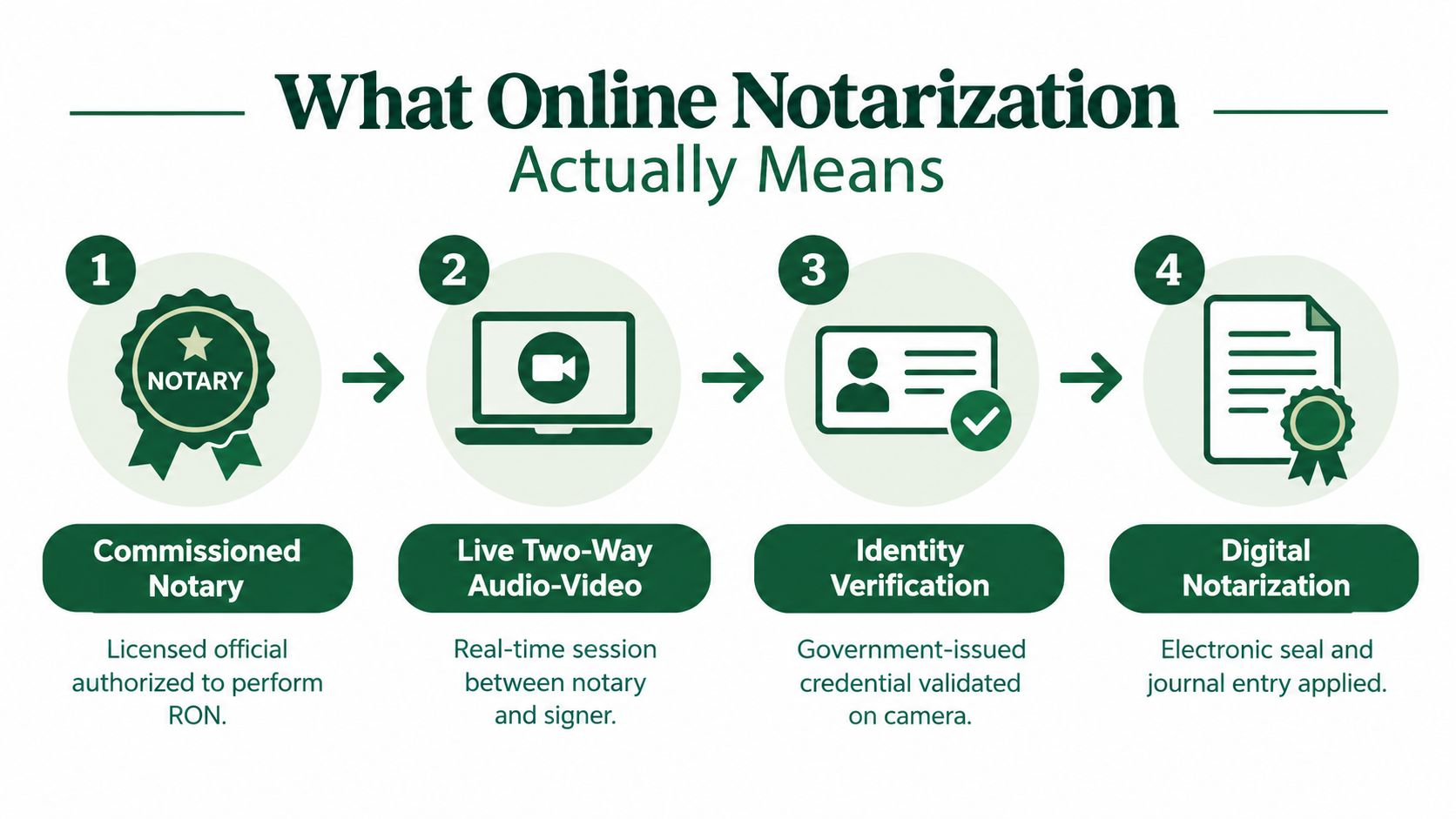
The process usually follows four stages:
- The notary enters with valid authority. The notary holds a current traditional commission and, where required, separate RON registration or approval.
- The signer enters the secure session. The platform checks a government-issued credential and applies other permitted identity controls.
- The notary conducts the live act. The signer answers questions, confirms willingness, and signs while the notary observes and communicates in real time.
- The platform completes the record. The notary applies the electronic seal and certificate. The system records the session and creates a journal entry.
RON and ordinary electronic signing serve different functions. A DocuSign transaction can capture consent to an electronic signature without a notary. RON adds an authorized official who verifies identity and performs a legally recognized notarial act.
In-person electronic notarization, or IPEN, also uses an electronic seal, but the signer travels to the notary. RON keeps both participants connected through remote communication technology.
The evidence trail continues after the meeting. North Dakota requires the audiovisual recording and notary journal to remain available for 10 years, according to its official remote notarization guidance. Texas requires an electronic record covering the date and time, act type, document description, parties, identity evidence, and recording, with the original and backup recording kept for five years. A founder should therefore plan for retention and the receiving institution's rules, not only the signing screen.
The Four Core Legal Requirements
Online notarization is easier to assess as a layered journey. Your camera connection and identity document matter first. The notary's authority, the live session, and the electronic record determine whether that signing can withstand review months later.
| Pillar | What It Ensures | How It Is Enforced |
|---|---|---|
| Notary authorization | The person performing the act has legal authority | Current commission, state approval, and any required RON registration |
| Identity proofing | The signer is the person represented by the credential | Government ID review, credential analysis, and permitted identity questions |
| Live audiovisual session | The act happened between the verified signer and notary | Continuous two-way communication, recording, and direct observation |
| Electronic signature and seal | The completed file can be connected to the notary and protected from alteration | Digital certificate, electronic seal, journal, and audit trail |
The notary must be authorized
In many states, remote online notarization builds on an existing notary commission. The notary first holds the traditional commission, then obtains the additional authorization or registration required for remote acts. Texas, for example, requires an online notary to hold a current traditional commission, be at least 18, be a state resident, meet criminal-history conditions, and pay a $50 application fee, as described in the AFSA RON overview.
Identity must be established, not merely asserted
A passport scan sent by email does not by itself show that the person on camera controls that passport. The platform may inspect the credential, compare its information with the signing record, ask permitted identity questions, and require the signer to display the document during the appointment.
The session must be live
The notary must see, hear, and communicate with the signer in real time. A recording cannot replace personal appearance. A pre-recorded video, proxy signer, or disconnected audio channel weakens the evidence that the verified signer personally completed the act.
The electronic record must be durable
The signature, seal, certificate, journal, and audiovisual record should form one connected evidence trail. Texas requires an electronic seal and digital certificate using PKI/X.509 compliance for online notaries, according to the Texas Secretary of State educational materials.
The work also continues after the video call. A state may impose requirements for training, registration, technology, signer location, storage, or retention. The receiving bank, registry, or public agency may apply its own rules as well. A technically successful session can therefore fail later if its authority, record format, or retention practice does not satisfy the place receiving the document.
Identity Verification and E-Signature Mechanics
The signer experience usually begins before the video call. You upload or present a driver's licence or passport, follow the platform's instructions, and complete identity questions if required. The system may inspect the credential's security features, compare information, and flag an expired document, an unreadable image, or a mismatch between the credential and the signing record.
The notary sees more than you do. While you see prompts and signature fields, the platform may capture identity-check results, timestamps, document versions, consent actions, and the sequence of clicks. The notary then confirms that the document displayed during the session is the document you execute.
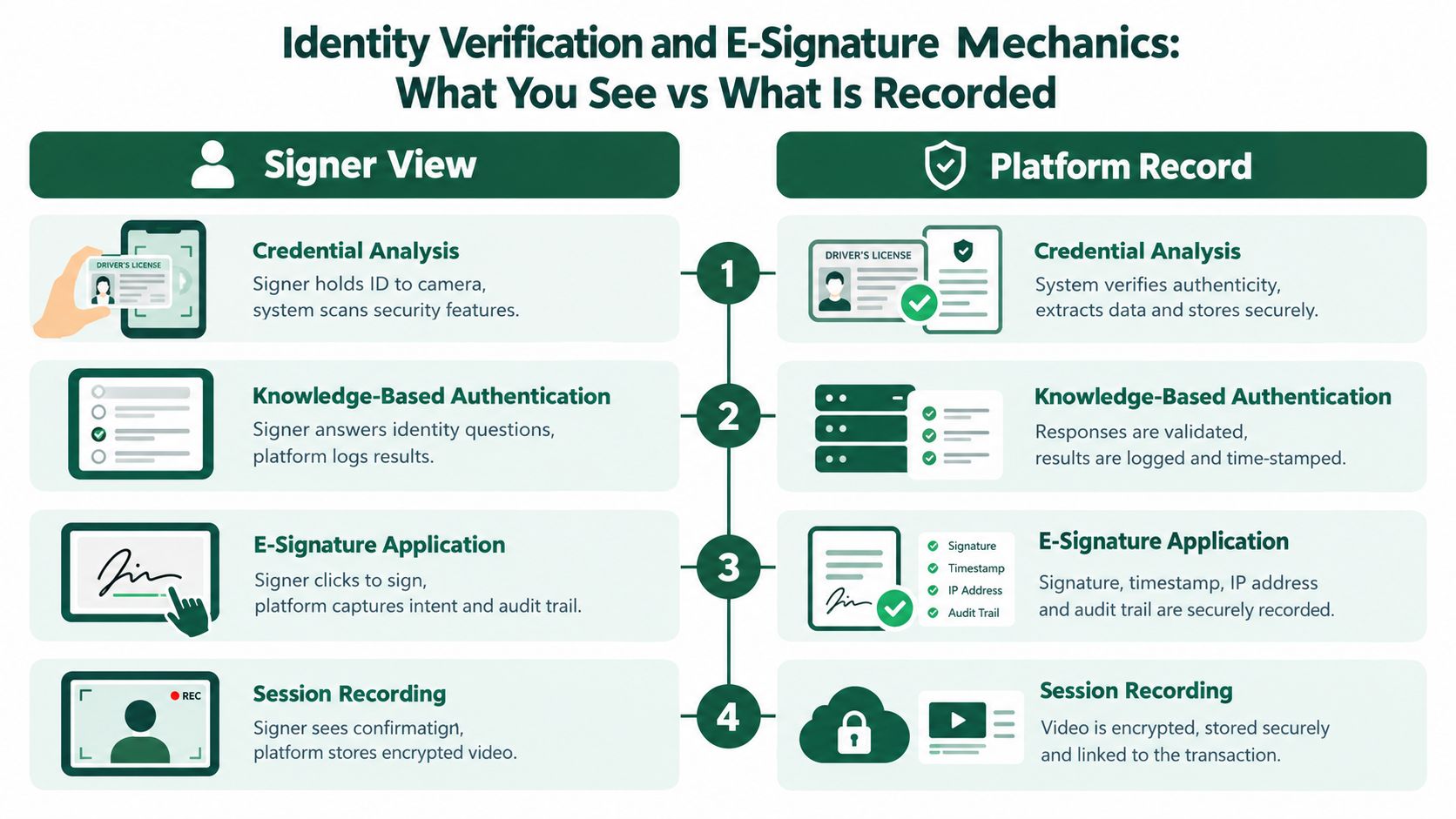
What can happen on screen
- Credential analysis: You hold the physical ID to the camera or use the platform's capture flow. The system checks whether the credential appears valid and consistent with the supplied details.
- Knowledge-based authentication: You answer questions generated from identity information. The platform records the result, rather than relying only on the notary's visual impression.
- Live confirmation: The notary asks you to confirm your willingness and understanding. You respond without another person standing in for you.
- Electronic execution: You apply your signature through the platform. The system records intent and binds the action to the final document.
- Seal and certificate: The notary applies the electronic seal and digital certificate, producing a tamper-evident file and an audit trail.
Preparation prevents many failed sessions. Use good lighting, clean the camera lens, keep the entire ID visible, and make sure the name on the document matches the identity information used for booking. Don't sign the document in advance unless the notary specifically tells you to do so.
A platform's marketing language also deserves scrutiny. Ask what certificate technology it uses, how it protects the electronic original, who can access the recording, and whether the recipient accepts its certificate format. Founders comparing identity verification solutions should evaluate the whole evidence chain, not just the convenience of the signing screen.
The distinction between what you see and what the system records is central. A green “complete” message confirms workflow completion. It doesn't, by itself, prove that the recipient will accept the file.
State-by-State Rules and Cross-Border Use
A founder in Europe can join a remote signing from abroad, complete the identity checks, and still face rejection later if the notary's state rules or the recipient's requirements do not match. U.S. online notarization follows state law. Virginia authorized remote electronic notarization first, Montana followed in 2015, and Texas enacted its online notarization law in 2017, effective July 1, 2018. By 2026, 45 states plus the District of Columbia had enacted RON statutes, yet authorization does not create one national procedure. The AFSA historical overview traces how quickly these rules developed.
| State | RON Authorized | Out-of-State Signers Allowed | Journal Retention | Special Training |
|---|---|---|---|---|
| Texas | Yes | May be possible under Texas rules and recipient requirements | Five-year recording period for the original and backup record | Online-notary authorization and compliant technology |
| North Dakota | Yes | Depends on applicable law and recipient acceptance | Ten years for the journal and audiovisual recording | State requirements apply |
| Minnesota | Yes | Confirm for the specific act | Confirm the applicable retention rule | Registration required before performing RON |
| Tennessee | Yes | Confirm for the specific act | Confirm the applicable retention rule | Online-notary course and exam required |
| New Mexico | Yes | Confirm for the specific act | Confirm the applicable retention rule | Existing notary status, RON course and exam, and official stamp submission |
| Florida | Yes | Confirm for the specific act | Confirm the applicable retention rule | Online education, registration, and third-party vendor contract |
New Mexico's official RON FAQ shows how setup requirements work in practice. An applicant must already be an existing notary public or automatic notarial officer, complete a remote online notary course and exam, and submit a RON official stamp within 45 days of approval. Florida requires education, registration, and a third-party vendor contract before application.
The location question
Your camera location and the notary's location are separate facts. A foreign signer may appear remotely, while the notary must remain physically within the state that authorizes the commission. Texas, for example, requires the online notary to be physically located within Texas during the act, according to the Texas Secretary of State guidance.
The receiving organization creates another checkpoint. A company registry, bank, court, or foreign authority may request an apostille, a particular certificate, or the electronic original in an accepted format. Review the document apostille process before booking the appointment. That long-tail check can matter months after the video call, especially when an EU founder is comparing a lower-tax structure such as Bulgaria with another jurisdiction.
Why Online Notarization Is Relevant for EU Founders
For EU founders, remote notarization sits beside the region's electronic identity and signature framework rather than replacing it. A qualified electronic signature under the eIDAS framework can carry significant legal weight, but it isn't automatically the same as a U.S. RON act. The correct method depends on the document, the country of incorporation, and the authority receiving it.
Bulgaria is a useful comparison point for founders considering an EU structure. Its standard corporate income tax is 10%, while Germany's combined corporate tax burden is often around 30% or more when trade tax is included. France and Spain each have a standard corporate tax rate of 25%. These figures are presented in the cross-country notary and tax comparison, and they make Bulgaria a notable low-tax reference point within the EU.
| Country | Corporate Tax Rate | Notes | Online Notarization Support |
|---|---|---|---|
| Bulgaria | 10% | Standard corporate income tax and a low-tax EU comparison point | Remote identity verification and online document signing may support eligible formation workflows |
| Germany | Around 30% or more when trade tax is included | Combined burden varies by municipality and circumstances | Electronic processes depend on document and authority |
| France | 25% | Headline corporate tax rate | Acceptance depends on the transaction and recipient |
| Spain | 25% | Standard corporate tax rate | Acceptance depends on the transaction and recipient |
The benefit of remote signing is operational, not magical. A founder in Berlin, Paris, or Madrid may complete eligible incorporation documents without travelling to Sofia, while a local service provider coordinates identity checks, powers of attorney, corporate documents, and any required legalization.
Tax should never be the only decision. Management substance, VAT obligations, banking, payroll, accounting, permanent-establishment exposure, and the founder's personal tax position can change the result. Bulgaria is an example for comparison, not a universal recommendation.
Remote notarization reduces travel and coordination friction, but it doesn't remove the need to confirm which legal form and signing method the receiving authority accepts.
For company formation, the practical question is whether the entire chain works. Can the founder verify identity remotely? Can the notary issue the required certificate? Can the registry accept the electronic document? Can a bank rely on the same documents? Those answers matter more than the word “online” in a provider's description.
Common Misconceptions That Lead to Rejected Documents
Remote signing feels familiar because the interface resembles a video call and an e-signature tool. The legal record is more demanding. A few casual assumptions create most avoidable problems.
Myth one, any camera works
A phone selfie or ordinary Zoom call doesn't automatically create a compliant RON record. The approved platform must support the required live communication, recording, identity workflow, document controls, and audit trail. If the audio drops or the recording fails, the notary may need to stop and restart the act.
Myth two, a passport scan is enough
A scan gives the platform an image, not proof that the person signing controls the credential. Many systems combine credential analysis with live presentation and identity questions. An expired ID, glare, poor lighting, or a name mismatch can cause failure.
Myth three, any electronic signature counts
An electronic signature alone doesn't establish that a notary performed the act. The file needs the notary's certificate and seal, along with a record connecting the seal to the authorized official and the signing session.
Myth four, RON works everywhere
State law controls the notary's authority, while the recipient controls practical acceptance. A document can be validly notarized under one state's law and still require additional legalization or a different format for an overseas registry.
Myth five, the emailed copy is the original
A downloaded PDF may be a copy of the digitally sealed electronic original. Keep the file that contains the notarial certificate, seal, and audit evidence. Don't flatten it, print it, or resave it in a way that strips validation data before submission.
These aren't unlucky edge cases. They are process errors. A recorder's office may question a document where the notary's commission had expired, while an overseas authority may reject a file because its electronic certificate cannot be validated. A recipient can also refuse a remote act even when the notary followed the applicable state procedure.
Practical Checklist and What's Changing Next
A remote signing can fail before anyone signs. Treat the process as a layered journey: prepare the person and document first, control the live appointment, then protect the electronic record and its future use.
Before the session
- Choose the right ID: Confirm that your passport or driver's licence is valid, readable, and accepted by both the platform and the recipient. Glare, an expired document, or a name mismatch can stop verification.
- Prepare the document: Complete the fields, but wait for the notary's instruction before signing. Check names, dates, entity details, and attachments against the recipient's requirements.
- Confirm authority: Verify that the notary is commissioned and authorized to perform RON under the relevant state's rules.
- Test the setup: Check the camera, microphone, browser, lighting, and internet connection. A short platform test can expose technical problems before the appointment.
- Ask the recipient: Confirm whether it accepts RON, electronic originals, digital certificates, and apostilled documents. A valid remote act can still need a different format or additional legalization for its destination.
During the session
The notary should be able to see and hear you continuously. Sit where your face and ID remain clear, remove anything blocking the microphone, and ensure that every required signer appears on screen. If someone assists with translation or technology, identify that person to the notary rather than allowing an unidentified participant to influence the act.
Answer identity questions yourself. Review the document carefully, confirm that you understand what you are signing, and apply your electronic signature only when instructed. Before ending the session, check that the notarial certificate and seal appear in the completed file.
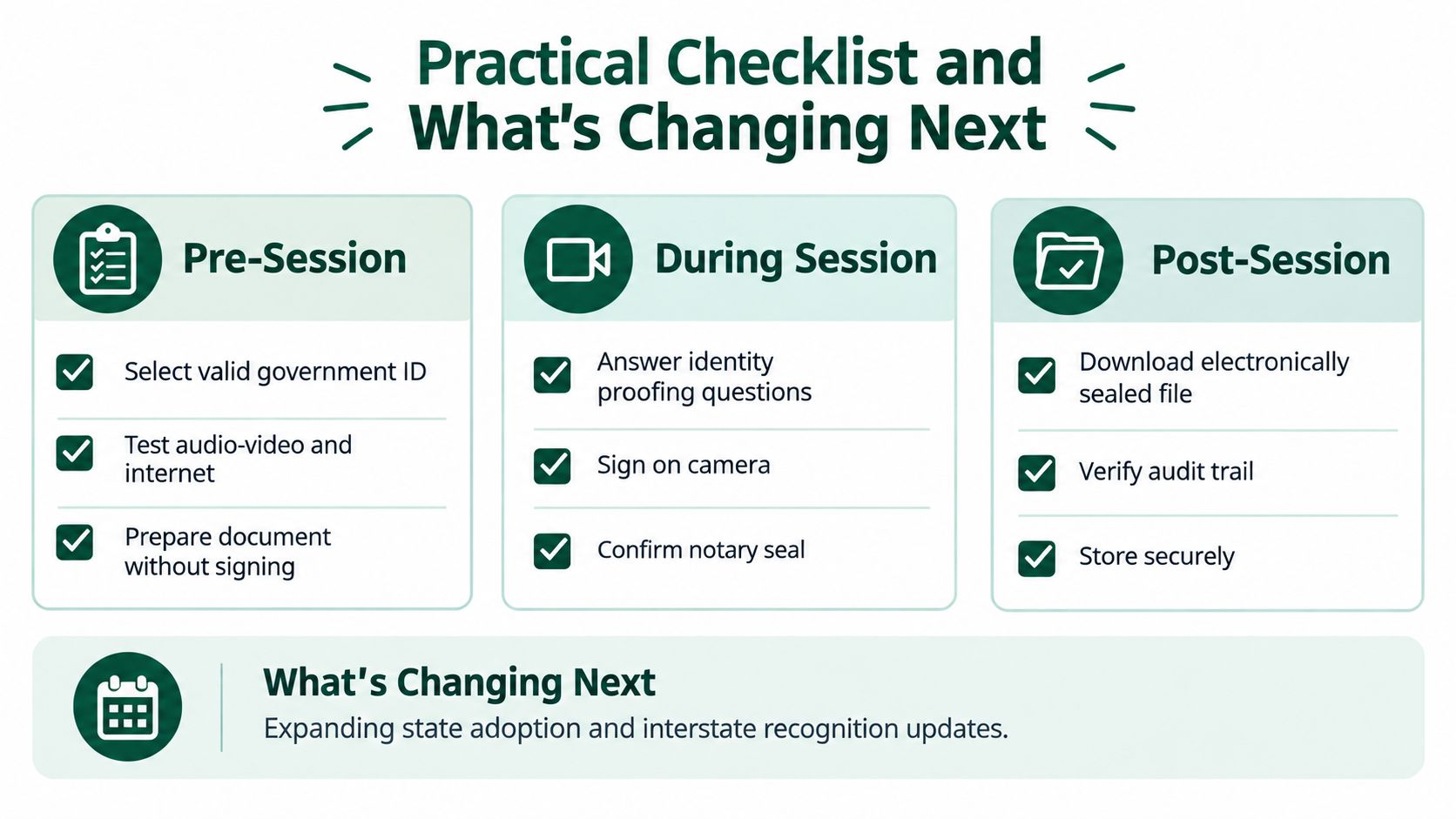
After completion
- Download the electronic original: Preserve the sealed file in its native form.
- Verify the audit trail: Check the certificate, seal, signer details, and completion information.
- Store the record securely: Keep the document and access information where your company can retrieve them for the required retention period.
- Arrange legalization: If the document crosses a border, confirm whether an apostille or another certification is needed.
- Send the correct file: Do not substitute a screenshot, printed scan, or flattened PDF for the digitally sealed original.
Retention continues long after the appointment. North Dakota requires the journal and audiovisual recording for 10 years, while Texas requires the original and backup recording for five years. Build those obligations into your storage policy, access controls, and handover plan rather than treating them as a task for the signing day.
The rules are still changing. Washington's 2026 update added identity verification, recordkeeping, audiovisual retention, and five-year retention rules for electronic notarization records, with some provisions taking effect in 2027. It also permits remote notarization of tangible records starting in 2027, subject to a recorded signing session and the principal mailing the signed paper to the notary within three days, according to the DLA Piper eSignature and ePayment update.
Minnesota requires registration before a notary performs RON, and Tennessee has added an online-notary-specific qualification involving a course and exam, as reported in that update. Before a high-stakes signing, confirm the current state rule, recipient policy, and platform process. Schedule a 15-minute platform test so the appointment is routine rather than experimental.
For Bulgarian company formation, FastCorp coordinates remote identity verification and document signing through a secure online notary process, alongside incorporation, VAT setup, banking assistance, and ongoing compliance. Visit FastCorp to review the online formation workflow and confirm which notarization and apostille steps apply to your documents.