European VAT Number Validation: The Complete How-To Guide
Master European VAT number validation with step-by-step VIES instructions, automated API options, and real remediation tactics. Fast, practical, and error-free.
A customer has just sent an invoice with an EU VAT number, and your accounting team needs to decide whether to apply reverse charge or zero-rating. The number looks plausible, but appearance isn't evidence. One incorrect digit, a missing country prefix, or a registration that isn't enabled for intra-Community transactions can turn a routine cross-border sale into a compliance problem.
European VAT number validation gives you a defensible checkpoint before invoicing. The practical method is straightforward: check the number's structure, run a live VIES lookup, interpret the response correctly, and retain the result with the transaction record.
Table of Contents
- Why European VAT Number Validation Matters for Your Business
- How to Validate a VAT Number Using the VIES Portal
- Understanding VIES Validation Results and What They Mean
- Manual Checks Versus Automated API Validation
- Tax Comparison Between EU and Other Countries
- What to Do When a VAT Number Is Invalid
- Final Tips for Stress-Free VAT Compliance
Why European VAT Number Validation Matters for Your Business
VIES, the European Commission's VAT Information Exchange System, is the public interface businesses use to validate European VAT numbers. It doesn't hold one single EU-wide database. Instead, it routes your query to the national VAT register of the issuing country and returns a yes or no result, sometimes with the registered name and address. The Commission introduced VIES for all 25 EU Member States on 1 May 2004, making cross-border VAT checks available at EU scale for the first time (European Commission historical VIES notice).
That architecture explains both the strength and the limitation of the system. You get an immediate public check, but the answer depends on the accuracy and timeliness of the national record behind it. A valid result supports your due diligence, but it doesn't prove that the customer is solvent, established, or compliant with every tax obligation.
The compliance decision behind the lookup
For qualifying intra-Community goods supplies, VAT identification number validation became tied to VAT exemption conditions after the EU adopted Council Directive (EU) 2018/1910 on 4 December 2018 (analysis of the EU validation requirement). That shifted validation from a useful administrative habit toward a formal part of cross-border VAT control.
In practice, the check helps you decide whether the customer's VAT status supports the intended treatment. Depending on the transaction, that may involve applying zero-rating to an eligible intra-EU supply or using reverse-charge treatment for a service. The VAT number is only one part of the analysis, so confirm the place of supply, customer type, transport evidence, and invoice wording separately.
Practical rule: Validate before issuing the invoice, not after an auditor asks why you treated the sale as VAT-free.
A reliable record should show the number submitted, issuing country, date and time of the query, returned result, and any name or address details displayed. If the result is inconsistent with the customer's documents, pause the tax treatment until you understand why.
How to Validate a VAT Number Using the VIES Portal
Manual validation works well when a person handles occasional checks. Start at the official VIES VAT validation portal and select the country that issued the number. Don't choose the country where your business is located unless it is also the country that issued the customer's VAT number.
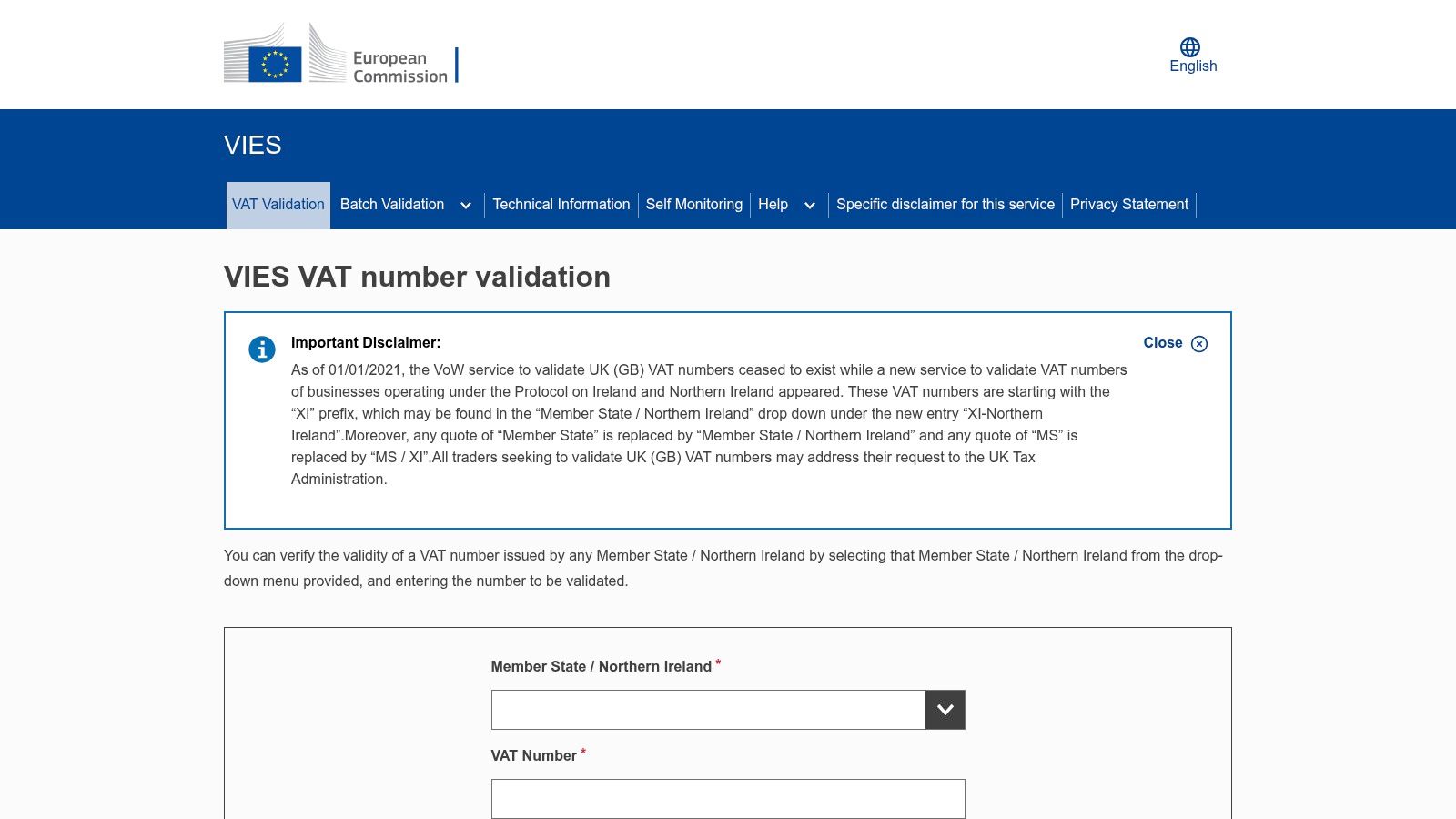
Enter the national VAT identifier in the field provided. The practical formatting rule is simple: use the correct issuing-country prefix and enter the number without spaces, dots, or dashes. VIES supports VAT numbers issued by all 27 EU Member States plus Northern Ireland, where the country prefix is XI (European Commission VIES service).
A clean manual checking routine
- Copy the number from the customer's records. Avoid retyping it when possible, because manual transcription creates avoidable errors.
- Separate the prefix from the identifier. If the portal has a country selector, select the issuing state and enter the national portion in the number field as requested by the interface.
- Remove punctuation. Spaces, dots, and dashes can cause a formatting failure rather than a genuine registry failure.
- Submit the query once. Record the response immediately, including any name or address returned.
- Save evidence. Store a PDF, screenshot, or system log with the customer and transaction record.
The portal's response is a real-time lookup against the relevant national register. A timeout, unavailable service, or formatting mistake isn't the same as an invalid number. If you regularly invoice EU customers, a clear explanation of EU VAT identification numbers can also help your team understand why national formats differ.
The portal is useful for one-off work, but don't treat it as a substitute for reviewing the transaction itself. Confirm the customer details, supply type, and evidence needed for the chosen VAT treatment.
The following video provides a visual walk-through of the portal workflow.
Understanding VIES Validation Results and What They Mean
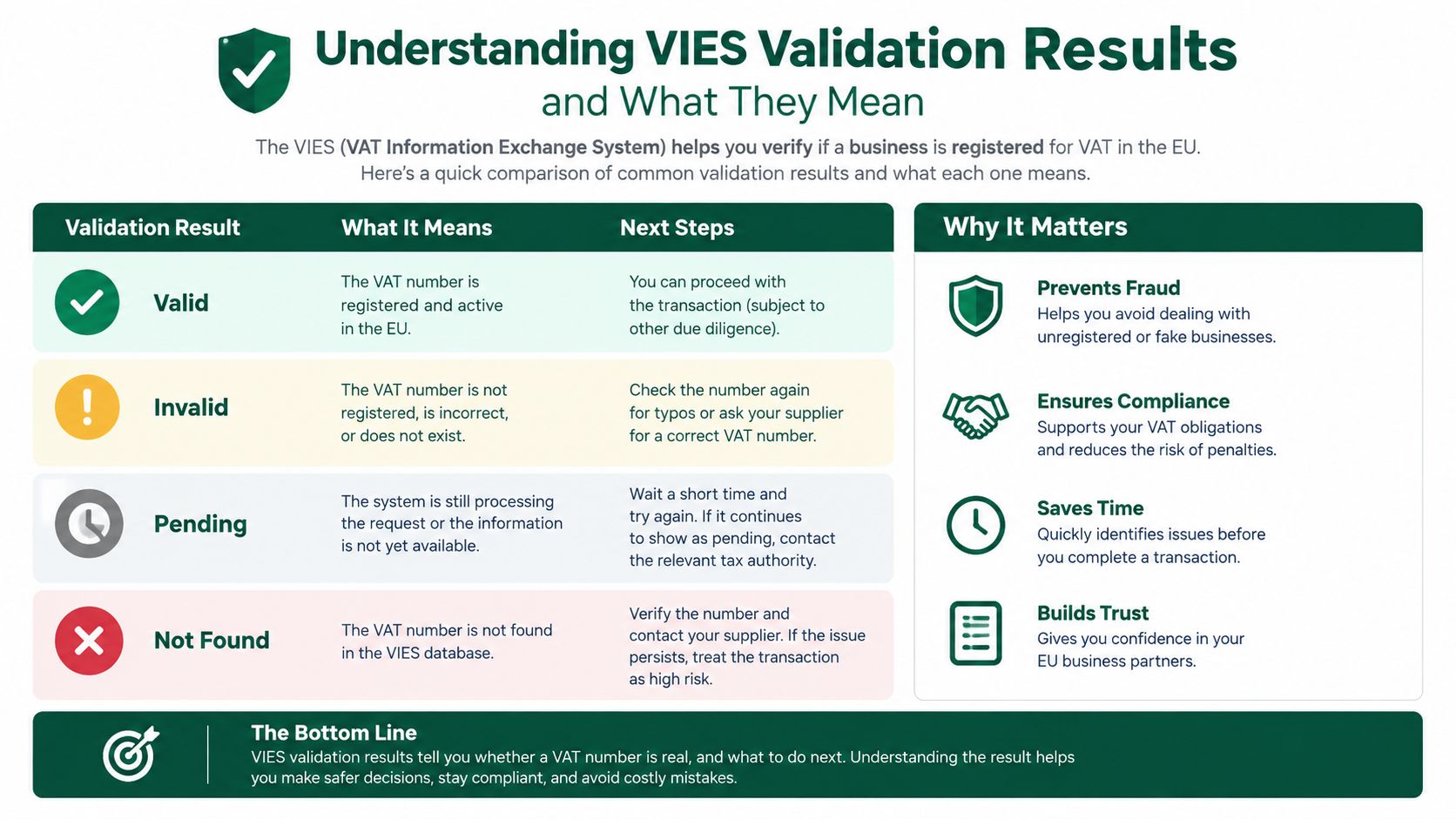
A VIES response is narrower than many teams assume. It answers whether the VAT number exists as valid or invalid at the time of the query. It doesn't confirm broader tax compliance or establish that the business is legally operating.
Valid
A valid response means the issuing authority's register recognized the number for the query. If the portal also returns a name and address, compare those details with the customer's legal documents, purchase order, and payment information. A match strengthens your file, but it doesn't remove the need to check whether the transaction qualifies for exemption or reverse charge.
Save the result before you issue the invoice. The check is time-specific, so your record should show when you performed it rather than merely stating that the customer is “VIES valid.”
Invalid
An invalid response can mean the number doesn't exist, the digits or prefix are wrong, or the record isn't available for the relevant cross-border activity. It can also reflect a national database update that hasn't propagated to VIES yet. Treat the response as a reason to investigate, not automatic proof of fraud.
Registration not activated for intra-Community transactions
A business can hold a domestic VAT registration without having that registration activated for intra-EU transactions. In that situation, the number may be genuine in its home country but unavailable for the cross-border treatment you're considering. The European Commission identifies this distinction, along with nonexistent or not-yet-finalised registrations, as a possible reason for an invalid result (EU guidance on checking VAT numbers).
A failed VIES result is a compliance signal. It isn't a verdict about the customer.
Your next step depends on the result and the transaction. A valid result supports documented due diligence. An invalid or unavailable result calls for format checks, customer confirmation, and, where necessary, contact with the national tax authority.
Manual Checks Versus Automated API Validation
Manual VIES checks and API validation solve the same core problem, but they fit different operating models. Manual checking is transparent and easy to start. API validation is better when the check must happen inside checkout, customer onboarding, invoicing, or an accounts-receivable workflow.
| Consideration | Manual VIES portal | Automated API validation |
|---|---|---|
| Best fit | Occasional customers and low-volume invoicing | Repeated checks across orders, invoices, or onboarding |
| User effort | A person copies, submits, reviews, and records each result | Software sends the request and stores the response |
| Error exposure | Copying, wrong country selection, and missed evidence remain human risks | Formatting and workflow rules can be standardized |
| Exception handling | Staff notice failures directly in the portal | The system can route failures to a review queue |
| Audit trail | Requires disciplined screenshots or notes | Can attach timestamps and responses to the customer record |
| Implementation cost | Minimal setup | Requires integration, testing, monitoring, and access controls |
Choose based on workflow, not fashion
If you validate a small number of new customers, manual VIES use may be entirely adequate. Create a standard operating procedure, assign responsibility, and require evidence before the invoice is approved.
Automation becomes practical when staff repeat the same lookup throughout the day or when a VAT check is a required gate before an order can proceed. Build the integration to validate the country prefix and number structure locally first, then send only plausible inputs to the live registry. This two-stage model reduces unnecessary requests and catches obvious errors early.
Don't let an API hide uncertainty. The system should distinguish a valid response, an invalid response, a timeout, and a technical error. It should never mark a customer as fraudulent merely because the external service didn't respond.
FastCorp is one example of a provider whose EU VAT registration and accounting workflow includes VIES handling where applicable. Whether you use an external provider, accounting software, or your own integration, define who reviews exceptions and how the evidence is retained.
Tax Comparison Between EU and Other Countries
The EU's practical advantage is the common validation layer. Each Member State issues its own national VAT number, while VIES provides a shared public checking interface across the participating jurisdictions. That combination keeps issuance decentralized for national tax authorities but gives businesses one familiar route for cross-border EU checks (EU overview of VAT identification numbers).

That doesn't mean every international tax check works the same way. Outside the EU, businesses often need separate country-specific systems. The UK VAT checker, for example, is a distinct workflow after Brexit rather than an extension of the EU validation layer. A company selling across the EU and the UK therefore needs different procedures, even when the commercial process looks identical.
Why the EU workflow feels simpler
The check is online and immediate, so a finance professional can validate a counterparty without calling an office or waiting for a paper confirmation. The same digital direction appears in related administration. Official guidance says the EU's One Stop Shop registration is electronic, and Member States must accept the required information electronically, although they can choose how to collect it (Belgian Federal Public Service Finance guidance).
| EU framework | Many non-EU workflows |
|---|---|
| Common checking interface | Separate national or country-specific portals |
| Immediate online lookup | Processes and response times vary |
| Shared cross-border reference point | Different data fields and evidence requirements |
| Common EU context | More country-by-country procedure design |
For global founders and freelancers, the lesson is operational. Standardize your EU procedure around VIES, then create separate rules for markets outside the framework. Don't assume a successful EU check tells you how to validate a non-EU customer.
For broader context on how rates affect invoicing decisions, review this practical guide to the EU VAT rate structure.
What to Do When a VAT Number Is Invalid
An invalid result needs a controlled response, not an improvised email to the customer. Begin with the easy causes because they're common and quick to eliminate.
- Check the country. Confirm that the selected country issued the number. A correct identifier under the wrong national register will fail.
- Check the characters. Remove spaces, dots, and dashes, then compare every digit with the source document.
- Confirm the prefix. Use the relevant national prefix, or XI for Northern Ireland where applicable.
- Run the query again. A timeout or portal problem isn't equivalent to an invalid registry result.
- Ask the customer to confirm activation. The business may have a domestic VAT registration that isn't enabled for intra-Community transactions.
- Hold the intended tax treatment. Don't apply zero-rating or reverse charge solely because the customer supplied a number that VIES couldn't confirm.
Separate data problems from registry problems
The European Commission warns that national-register changes aren't always reflected immediately in VIES. A newly issued or amended registration may therefore need time to appear. Ask the customer for confirmation from its tax authority or other official registration evidence, but don't treat informal correspondence as an automatic replacement for the required transaction analysis.
If the number remains unavailable, contact the national tax authority of the issuing country. Give them the exact number, legal entity name, query date, and the cross-border purpose of the check. Ask whether the registration exists, whether it's activated for intra-EU transactions, and whether the record is awaiting finalisation or database propagation.
A strong internal policy states what happens while the issue is open. The invoice may need domestic VAT treatment, a delayed issue date, or review by your tax adviser, depending on the supply and applicable law. Document the decision and the reason instead of allowing a sales deadline to dictate tax treatment.
Teams also need a separate process for businesses that haven't registered yet. FastCorp's overview of VAT registration requirements can help frame the information needed before a new EU trading structure enters the validation workflow.
Final Tips for Stress-Free VAT Compliance
The most reliable teams make validation a routine control rather than a last-minute search. They ask for the customer's legal name, address, country, and VAT number during onboarding, then validate the number before the first relevant invoice. That prevents sales staff from making tax decisions under deadline pressure.
Keep the workflow simple:
- Validate early. Run the check before the transaction reaches invoice approval.
- Check structure locally. Reject impossible prefixes, lengths, or check digits before a live query.
- Record the result. Store the submitted number, response, timestamp, and returned identity details.
- Review exceptions. Route invalid, unavailable, and timeout responses to a named person.
- Match the treatment to the supply. VIES supports due diligence, but it doesn't decide whether zero-rating or reverse charge applies.
- Monitor regulatory guidance. VAT rules and digital administration continue to develop, so review your procedure when authorities update their instructions.
Operational habit: One saved validation result is useful. A repeatable process that saves every result is much stronger.
Manual portal checks remain perfectly workable for occasional transactions. API automation earns its place when validation is repeated, time-sensitive, or embedded in a larger invoicing system. In either case, the winning setup is the same: correct input, live confirmation, sensible interpretation, and an audit trail that another person can understand.
European VAT number validation is online, immediate, and manageable when you separate number validity from overall tax compliance. Build that distinction into your workflow, train the people who handle exceptions, and cross-border invoicing becomes far less stressful.
FastCorp helps global founders set up Bulgarian companies, arrange EU VAT registration, and coordinate accounting and VIES handling where applicable. Visit FastCorp to discuss an online compliance setup for your EU trading activity.