Payroll Administrator Responsibilities Explained
Master payroll administrator responsibilities with our enthusiastic guide. Learn core tasks, global tax comparisons, and how online tools make compliance easy.
You're staring at a payroll dashboard while messages arrive from HR, finance, and employees. A new hire needs adding, someone's benefits have changed, a termination requires careful handling, and a tax filing deadline is approaching. The outdated image of a payroll administrator buried under paper forms and sprawling spreadsheets doesn't help. Modern payroll work is far more controlled, connected, and strategic.
The key question isn't whether payroll administrators “run payroll.” It's how they protect pay accuracy, maintain compliant records, coordinate several departments, and keep statutory obligations on track. With online platforms, structured approvals, and global service partners, much of the repetitive work is easier to manage. The administrator's judgment, oversight, and ability to resolve exceptions have become more valuable.
Table of Contents
- The Modern Payroll Administrator Role
- Core Responsibilities and Daily Workflows
- Navigating Global Payroll Tax Compliance
- Collaborating with HR and Accounting Teams
- Leveraging Online Tools and Automation
- Best Practices for Accuracy and Auditability
- Streamlining Your Operations with FastCorp
The Modern Payroll Administrator Role
Consider a payroll administrator supporting a distributed team. Instead of collecting paper timesheets, the administrator reviews approved digital records, checks employee changes submitted through HR, validates deductions, and monitors a compliance calendar. The platform handles routine calculations, while the administrator investigates anything unusual before payroll is released.

That workflow captures the modern role. Payroll administrator responsibilities extend from employee data and gross-to-net calculations to tax reporting, benefits documentation, reconciliations, and privacy controls. Canada's national occupational profile describes duties such as preparing and verifying gross-to-net statements, processing regular and special payments, completing benefits forms, and producing year-end tax statements. Alberta's profile also includes remittances, terminations, Records of Employment, statistical reporting, discrepancy resolution, and safeguarding personal information, as summarized in this payroll administrator role profile.
The administrator sits between HR, finance, employees, software providers, and government bodies. A change entered incorrectly in an HR system can affect pay, benefits, tax deductions, and reporting. A missed approval can delay a pay run. An unexplained variance can signal a timekeeping, employee-status, or deduction problem.
From clerical processing to governance
Payroll became a regulated responsibility when employers took on formal withholding duties. In the United States, the 1935 Social Security Act made employers responsible for withholding and remitting payroll taxes, helping transform payroll from recordkeeping into recurring compliance work, as described in this history of payroll administration.
That legacy still shapes the job. Payroll administrators don't just enter numbers. They create a reliable control environment around money, personal data, statutory deductions, and employee records. Their work supports employee trust and the organization's legal standing at the same time.
Practical rule: Treat every payroll change as a controlled business event. Confirm who submitted it, who approved it, what evidence supports it, and where the final record is stored.
The role is also highly people-focused. Employees need clear answers about deductions, leave, benefits, and payslips. Managers need dependable deadlines. Finance needs reconciled figures. Government bodies need accurate submissions. A strong payroll administrator brings these requirements together without losing sight of the person behind each payment.
Core Responsibilities and Daily Workflows
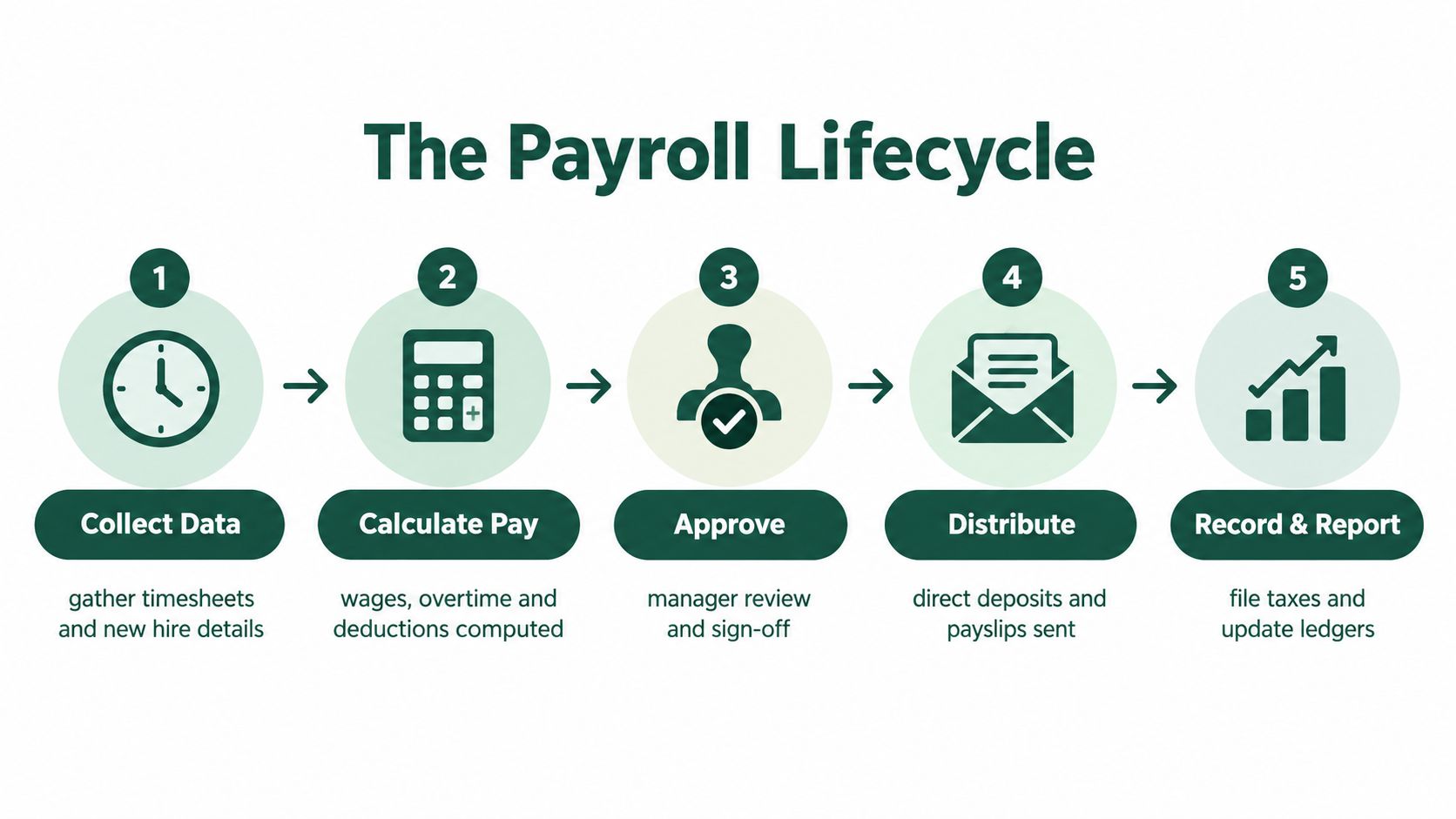
A dependable payroll cycle follows a repeatable sequence. Online systems make the sequence easier to monitor, but the administrator still owns the quality checks at each stage.
Start with clean inputs
The first task is collecting data. This can include approved hours, absences, overtime, new-hire details, salary changes, benefit elections, leave records, and termination information. Don't begin by calculating pay. Begin by confirming that the inputs are complete, authorized, and assigned to the correct employee and pay period.
A practical validation routine asks:
- Check employee status: Confirm that starters, leavers, transfers, and inactive employees have the correct effective dates.
- Compare time records: Look for missing approvals, unusual hours, duplicate entries, or unexplained changes from the previous cycle.
- Review deduction changes: Confirm that pensions, insurance, union dues, garnishments, and other deductions have supporting documentation.
- Separate exceptions: Move unusual payments, retroactive changes, and special payments into a review queue instead of allowing them to pass unnoticed.
This control approach reflects the operational duties described in the municipal payroll administrator job specification, including validating data, balancing records, posting journal entries, and coordinating with auditors and software vendors.
Calculate, review, and release
Once inputs are clean, the payroll system calculates gross pay, statutory deductions, benefits, garnishments, and net pay. The administrator reviews the results rather than assuming the system is correct. Software can apply configured rules consistently, but it can't always tell whether a manager approved the wrong hours or whether a status change was entered with the wrong date.
Review totals by department, location, pay type, and deduction category. Investigate large variances, unexpected zero payments, unusual net-pay movements, and changes in headcount. Then send the run through a documented approval workflow before distributing direct deposits and payslips.
Record and report
After payment, the work continues. Payroll administrators reconcile payroll to bank statements, post accounting entries, retain supporting records, and prepare recurring tax and statutory reports. Year-end documentation, benefit forms, Records of Employment, and other filings must remain traceable.
The easiest way to reduce pressure is to use a fixed payroll calendar. Assign owners for data submission, manager approval, administrator review, payment release, reconciliation, and filing. When each task has a deadline and an evidence trail, the cycle becomes manageable instead of dependent on memory.
Navigating Global Payroll Tax Compliance
International payroll becomes difficult because the same employee-pay process sits inside different tax systems. Countries can vary in employee income tax, employee social security, employer social security contributions, payroll taxes, cash benefits, filing formats, payslip rules, and record-retention requirements. The OECD's Taxing Wages 2026 materials compare these components across OECD countries and show a wide spread in payroll-tax burdens, including an employee-side comparison ranging from 8.1% in one United States comparison to substantially higher employer-side burdens in other OECD markets.
That comparison matters operationally. A payroll administrator must know whether a cost belongs to the employee, the employer, or both, and must configure the correct withholding and reporting treatment for each jurisdiction. A country with a relatively light employee-side burden can still create significant employer obligations through social contributions, local registrations, or filing requirements.
| Region / Country | Primary Tax Focus | Compliance Complexity |
|---|---|---|
| United States | Federal, state, and local withholding, plus employer and employee social security obligations | Multiple jurisdictional calendars and reporting layers |
| Canada | Income tax, statutory deductions, benefits, year-end statements, and provincial requirements | Federal and provincial coordination, with detailed employee records |
| OECD markets | Employee income tax, social security, employer contributions, payroll taxes, and cash benefits | Rules and burdens vary materially by country |
| Bulgaria | Corporate structure, payroll, social and health insurance, and electronic statutory filings | Local registrations, declarations, and Bulgarian reporting processes |
The table is a working orientation, not a substitute for local advice. For a practical overview of employer obligations, review payroll tax obligations and then confirm the specific requirements that apply to the employing entity and worker.
Build a jurisdiction control system
Start with a country matrix. Record the employing entity, employee location, pay frequency, withholding rules, contribution categories, filing deadlines, payment deadlines, required payslip information, and retention requirements. Add an owner and escalation contact for every jurisdiction.
Global guidance describes compliance as covering withholding, mandatory deductions, payslips, reporting deadlines, and record retention. Operationally, that means your payroll calendar must align with federal, state, provincial, local, and country-level deadlines, as explained in this global payroll compliance job specification.
Local compliance is a major concern for payroll professionals. A global survey reported that 57% of payroll professionals ranked local compliance as their biggest pain point, ahead of automation and vendor management, according to the Global Payroll Week survey review. The same source reported that 44% of firms planned to improve data security in payroll functions. These findings reinforce a useful lesson: cross-border payroll is as much about documentation and data governance as it is about tax calculation.
Online filing helps. OECD payroll-tax materials are available through structured, downloadable country tables, illustrating how modern compliance teams can monitor and compare jurisdictional requirements digitally through machine-readable payroll-tax data. The administrator still needs local interpretation, but online systems make calendars, approvals, submissions, and evidence far easier to organize.
Collaborating with HR and Accounting Teams
Payroll accuracy depends on the quality of information exchanged across departments. HR owns many employment events, finance owns much of the accounting context, and payroll turns approved information into employee payments and statutory records.
The HR connection
HR typically supplies onboarding details, employment terms, compensation changes, leave information, benefit elections, and termination instructions. Payroll checks whether each change has the right effective date and documentation. A termination, for example, can affect final pay, accrued leave, benefits, deductions, reporting, and access to employee records.
Create one formal change channel rather than accepting scattered requests through chat messages and email. Require the requestor to identify the employee, change type, effective date, approver, and supporting document. This simple structure prevents payroll from guessing.
Privacy matters at every stage. Payroll administrators handle personal information, bank details, tax data, benefit records, and sensitive employment events. Limit access by role, use secure transfer methods, and avoid placing confidential information in informal message threads.
A useful habit: If a payroll change can't be explained clearly from the source record, pause it and ask for confirmation before processing.
The finance connection
Finance relies on payroll totals for cash planning, expense reporting, reconciliations, and ledger entries. Payroll administrators may prepare journal entries, balance payroll records, reconcile the payroll bank account, and provide support during audits. The accounting relationship is easier when payroll categories map consistently to the general ledger, as outlined in these business accounting basics.
A clean monthly close compares the payroll register with the bank payment, liability accounts, tax payable balances, benefit deductions, and general-ledger postings. Differences should be logged with an owner and resolution date, not buried in a spreadsheet comment.
Resolve discrepancies without blame
Discrepancies usually have a source. Trace the record from the employee master file to timekeeping, payroll calculation, approval, payment, and ledger posting. Ask focused questions, such as whether the rate changed before the pay period, whether the manager approved the hours, or whether a deduction was configured for the correct jurisdiction.
This approach turns payroll into an operational hub. HR receives reliable employment data, finance receives controlled financial records, and employees receive accurate explanations. The administrator's communication skills are just as important as numerical accuracy because every unresolved issue can affect confidence in the entire organization.
Leveraging Online Tools and Automation
Online payroll platforms, HR systems, ERP software, and AI-assisted workflows have changed the administrator's daily work. A manual process asks someone to copy information between spreadsheets, calculate deductions, chase approvals, and assemble filing records. A modern process connects data sources, applies configured rules, routes exceptions, and preserves an approval history.
That doesn't remove responsibility. It changes where responsibility sits.
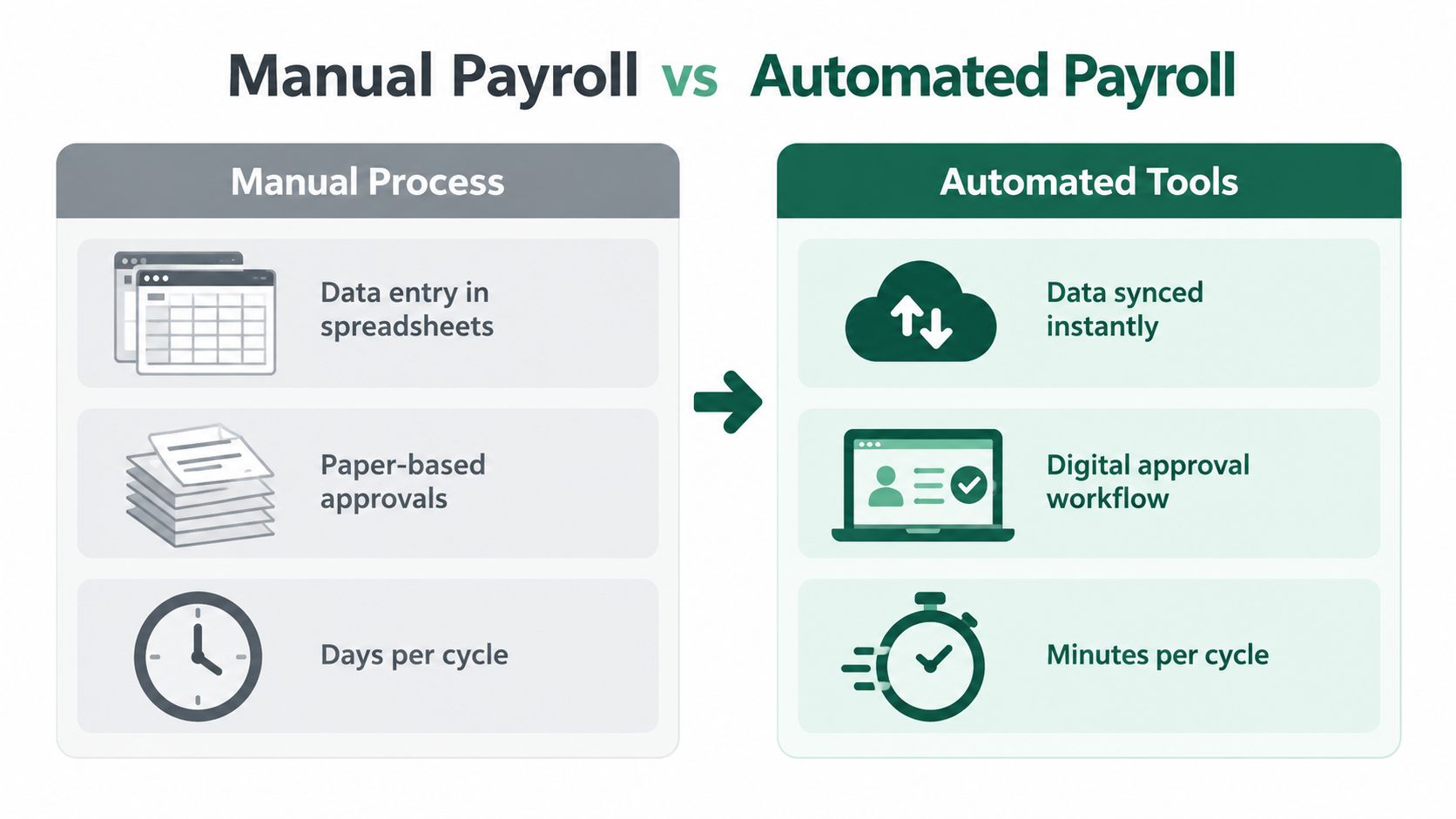
Manual work versus controlled automation
| Manual process | Automated online workflow |
|---|---|
| Re-enter time and employee data | Sync approved data from connected systems |
| Chase approvals through email | Route approvals through a visible workflow |
| Recalculate changes by hand | Apply configured calculation rules |
| Search folders for evidence | Store records with searchable audit trails |
| Discover errors after payment | Flag exceptions before release |
Tools such as an ERP payroll module, a cloud HR platform, and an expense or timekeeping integration can reduce duplicate entry. A payroll administrator should still review permissions, data mappings, effective dates, calculation settings, and exception queues. Automation is useful only when its inputs and rules remain trustworthy.
The payroll management tools guide can help teams compare the capabilities they need. Focus on practical controls, including role-based access, approval history, configurable calendars, integration logs, reporting, and exportable records.
AI supports judgment, not accountability
AI can help classify anomalies, summarize changes, identify missing fields, and prioritize unusual transactions. It shouldn't make the final decision on an ambiguous termination, a disputed deduction, or a complex cross-border tax issue without human review.
Recent industry coverage describes lean teams managing payroll, compliance, and hiring across several countries with AI and integrated systems at the center, as discussed in the Remote Workforce Report. That environment makes exception handling a core skill. The administrator needs to understand why a system flagged a transaction, verify the underlying evidence, document the decision, and escalate when local interpretation is required.
Data security must receive equal attention. Configure least-privilege access, review user permissions, protect exports, monitor vendor access, and define what happens when an employee leaves. Online work is easier to manage than paper-heavy processing, but convenience must not weaken privacy controls.
The following video offers additional context for thinking about digital payroll workflows.
Best Practices for Accuracy and Auditability
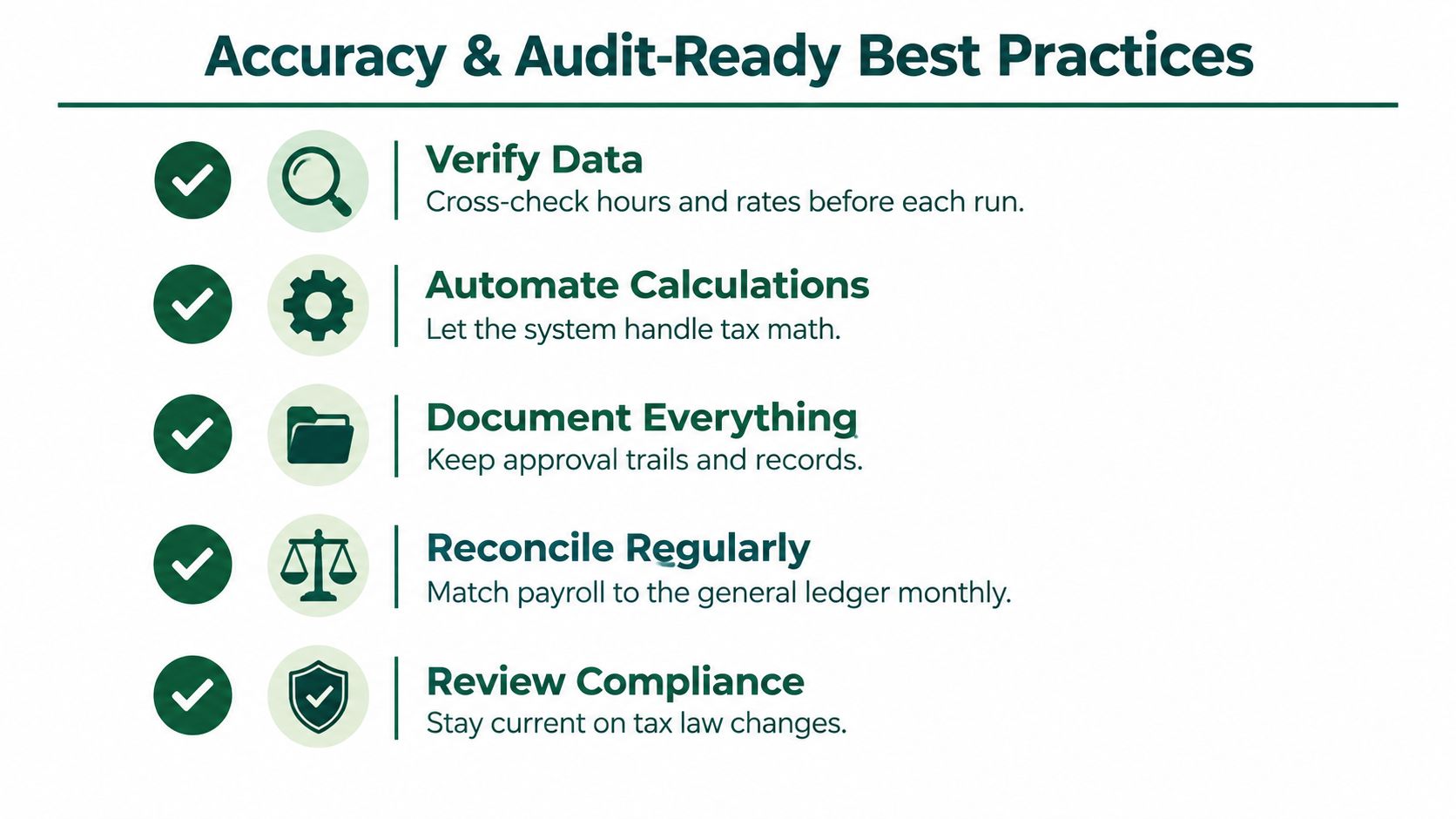
Accuracy comes from disciplined controls, not heroic last-minute checking. Build a repeatable routine that catches errors before payment and leaves a clear record for later review.
Use a pre-payroll checklist
Before final approval, work through the same checks every cycle:
- Verify data: Cross-check hours, rates, employee status, leave, and approved changes against their source records.
- Review calculations: Let the system handle configured tax and deduction math, then investigate exceptions instead of manually recalculating every routine transaction.
- Compare totals: Review gross pay, deductions, employer costs, net pay, headcount, and department totals against expected activity.
- Confirm approvals: Ensure managers and authorized payroll reviewers have approved the correct pay period.
- Secure the release: Restrict payment approval and confirm that bank details haven't changed without independent verification.
A payroll register should tell a coherent story. If one department's overtime rises, if a new deduction appears, or if a payment falls outside the normal pattern, the administrator should know why before releasing funds.
Preserve evidence as you work
Auditability is easier when documentation is created during the process. Store source files, approval records, calculation outputs, filing confirmations, payment evidence, reconciliation notes, and correction records in an organized location. Link each adjustment to its reason and approver.
Reconcile payroll to the bank and general ledger regularly. When the payroll register, payment file, liability balances, and ledger entries agree, finance can close with confidence and auditors can follow the transaction trail.
Keep compliance current
Assign someone to monitor tax-law and filing changes in every jurisdiction. Update the payroll calendar, system configuration, employee communications, and internal procedures when a rule changes. Don't rely on a single alert or an unverified online summary.
Audit-ready standard: Another trained person should be able to understand what happened, why it happened, who approved it, and which records support it.
Finally, maintain a correction process. If an error reaches an employee, record the issue, calculate the correction, communicate clearly, update the relevant filing or ledger entry, and document the preventive action. A transparent correction is safer than an unexplained adjustment.
Streamlining Your Operations with FastCorp
Payroll administrators can control a great deal internally, but an experienced compliance partner can reduce the operational load around entity setup, accounting, filings, and local payroll administration. FastCorp provides Bulgarian limited company incorporation, EU VAT registration, banking assistance, virtual office services, bookkeeping, VAT returns, annual corporate tax filings, payroll administration, and statutory reporting through online workflows.
For global founders, that structure can connect payroll administration with the wider compliance environment instead of leaving payroll as an isolated task. FastCorp states that its online formation process can be completed in 3–5 working days, with ongoing accounting and reporting support handled through the same provider. Bulgaria's 10% corporate tax regime may also be relevant to businesses assessing EU structures, but founders should obtain advice suited to their facts and eligibility.
The strategic lesson is simple. A payroll administrator's job is not shrinking because software and outsourcing exist. The role is becoming more focused on validation, governance, privacy, compliance judgment, and employee trust. Online tools handle routine movement of data, while skilled professionals make sure the system's decisions are accurate and defensible.
FastCorp offers online Bulgarian company formation, EU VAT registration, bookkeeping, payroll administration, and statutory reporting for global founders seeking an EU-compliant operating structure. Visit FastCorp to review the available formation and accounting support and connect your payroll responsibilities with a more manageable compliance workflow.